Podcast Hosting for Beginners: The 2025 Guide to Choosing Your First Platform
Podcasting has never been more accessible. According to Edison Research’s 2024 Infinite Dial study, 47% of the US population now listens to podcasts monthly, up 12% from the previous year. That’s the largest podcast audience in history, and it’s still growing. Female listeners alone increased by 15-19% year over year.
Here’s the thing: you don’t need thousands of downloads to start. You don’t need expensive gear. You don’t even need to understand what an RSS feed is (yet). What you do need is a podcast hosting platform that stores your audio files and delivers them to listeners on Apple Podcasts, Spotify, and everywhere else.
The problem? There are over 50 hosting platforms, each claiming to be “the best for beginners.” Some charge by storage, others by downloads, and a few offer truly unlimited hosting. The jargon is overwhelming. The pricing pages are confusing. And the fear of making the wrong choice keeps too many would-be podcasters stuck in research mode forever.
This guide cuts through the noise. You’ll learn what podcast hosting actually is, what features you genuinely need as a beginner (and which ones you can skip), how to avoid the most common mistakes, and a simple framework for choosing your first platform. No technical overwhelm. No aggressive upselling. Just clear guidance to get you from “thinking about it” to “published and live.”
Quick Takeaways:
- What beginners actually need: unlimited storage, automatic distribution, basic analytics
- What beginners DON’T need yet: dynamic ads, team features, IAB-certified analytics
- Budget sweet spot: $9-15/month for serious beginners who want room to grow
- Setup time: 1-2 hours from signup to live on Apple Podcasts and Spotify
- Key insight: Choose based on where you’ll be in 12 months, not where you are today
What Is Podcast Hosting (And Why Do You Need It)?
Let’s start with the basics. If you’re new to podcasting, the terminology can feel like learning a foreign language. RSS feeds, media hosting, distribution, analytics. It sounds complicated. It’s not.
Podcast Hosting Explained Simply
Think of podcast hosting like a home for your audio files. When you record an episode, that audio file needs to live somewhere on the internet. Your hosting platform stores those files and makes them available to podcast apps around the world.
Your hosting platform does three essential things:
- Stores your audio files so they’re accessible 24/7
- Generates an RSS feed (a special link that podcast apps read to find your episodes)
- Delivers your episodes to listeners when they hit play
That’s it. Everything else, the analytics, the distribution tools, the fancy features, builds on top of those three core functions.
Why You Can’t Just Upload to Spotify
This is the question every beginner asks. “Can’t I just upload directly to Spotify or Apple Podcasts?”
The short answer: no. Unlike YouTube, where you upload videos directly to their servers, podcast platforms don’t work that way. Apple Podcasts, Spotify, Amazon Music, and every other podcast app are directories, not storage services. They read your RSS feed and display your episodes, but they don’t host your files.
You need a hosting platform that stores your audio and generates the RSS feed. Then you submit that feed to Apple, Spotify, and other directories. They pull your episodes automatically whenever you publish something new.
(The one exception is Spotify for Creators, formerly Anchor, which does host files directly. But that comes with significant trade-offs we’ll cover later.)
The Central Hub Analogy
Here’s the simplest way to understand it: your podcast hosting platform is like a website for your podcast. It’s the central hub that feeds content everywhere.
When you publish a new episode, your hosting platform updates your RSS feed. Apple Podcasts checks that feed every few hours and pulls in the new episode. Spotify does the same. So does every other podcast app. One upload, automatic distribution to all platforms.
This is actually a huge advantage. You maintain control of your content from one central location. If you ever want to switch hosts, you take your RSS feed with you. Your subscribers don’t need to do anything. They just keep listening.
Quick Takeaway: Podcast hosting stores your files and generates the RSS feed that podcast apps read. You can’t skip it.
What Do Beginners Actually Need in Podcast Hosting?
Here’s where most guides go wrong. They list every possible feature and leave you more confused than when you started. As a beginner, you need to focus on what matters now and ignore what matters later.
Core Features Worth Paying For
These are the features that actually impact your podcasting experience as a beginner:
Unlimited storage and bandwidth. You don’t want to worry about running out of space or getting charged extra when listeners download your episodes. Some platforms cap storage at 3-10 hours per month. Others charge per download after you hit a threshold. Look for truly unlimited hosting so you can upload your episodes without doing math.
Automatic distribution. Your hosting platform should make it easy to submit your podcast to Apple Podcasts, Spotify, Amazon Music, and other directories. The best platforms handle this with one-click submission. You shouldn’t need to manually copy RSS feed URLs and navigate submission forms for each platform.
Basic analytics. You need to know if anyone is listening. Basic analytics show you downloads per episode, listener locations, and which apps people use. This is enough to understand your audience when you’re starting out. You don’t need advanced metrics yet.
Simple upload process. Recording and editing is hard enough. Uploading should be easy. Look for platforms with drag-and-drop upload, automatic audio optimization, and clear publishing workflows. If the interface feels confusing, that’s a red flag.
Reliable delivery. When someone hits play, your episode should start immediately. Cheap hosting platforms sometimes throttle bandwidth during high-traffic periods, which leads to slow downloads and frustrated listeners. Reliability matters more than fancy features.
Features You Don’t Need Yet (Avoid Overwhelm)
These features are valuable for established podcasters, but they’re overkill when you’re starting out:
Dynamic ad insertion. This lets you insert and update ads across your entire back catalog. Powerful for monetization, but you need an audience first. Most beginners won’t have sponsors for months or even years.
Team collaboration. Multiple user accounts, role-based permissions, approval workflows. Great for podcast networks. Unnecessary if you’re a solo creator or working with one co-host.
Multiple shows on one account. Some platforms charge based on how many podcasts you host. Unless you’re planning to launch several shows immediately, don’t pay extra for this.
IAB-certified analytics. The IAB (Interactive Advertising Bureau) sets standards for accurate podcast measurement. Advertisers require IAB-certified numbers. But when you’re starting out, basic download counts are sufficient. IAB certification matters when you’re ready to monetize, not before.
Advanced scheduling. Some platforms offer complex scheduling with episode dripping, season management, and time-zone optimization. Helpful eventually, but simple “publish now” or “schedule for date” covers most beginners.
Quick Takeaway: Focus on unlimited hosting, easy distribution, and basic analytics. Everything else can wait until you’ve published your first 10-20 episodes.
What Are the Most Common Beginner Mistakes?
After seeing thousands of podcasters choose hosting platforms, certain patterns emerge. These five mistakes cost beginners time, money, and sometimes their motivation to continue.
Mistake 1: Overbuying Features You Won’t Use
The enterprise plan looks impressive. Team collaboration for 10 users. Advanced analytics. Multiple shows. Dynamic ads. API access. It’s only $49/month.
But you’re a solo podcaster launching one show. You don’t need team features. You won’t use dynamic ads until you have an audience. Advanced analytics won’t help if you’re not publishing consistently.
Overbuying creates two problems: you waste money on unused features, and the complex interface overwhelms you. Simple platforms help you focus on what matters (creating content) instead of getting lost in dashboards you don’t need.
Mistake 2: Underbuying and Outgrowing in 6 Months
The flip side is equally dangerous. You choose the cheapest plan because you’re “just starting out.” Six months later, your podcast grows faster than expected. You hit download limits. You want analytics that aren’t included. You need features locked behind higher tiers.
Switching platforms is possible but painful. You lose historical analytics. Some subscribers might not follow the redirect. The migration takes hours of work when you’d rather be creating content.
Choose based on where you’ll be in 12 months, not where you are today. A platform that’s slightly more expensive now can save significant hassle later.
Mistake 3: Choosing Based on “Free” vs Value
Free hosting sounds appealing. Why pay when Spotify for Creators offers hosting at no cost?
The catch: free platforms have trade-offs. Spotify for Creators prioritizes Spotify’s ecosystem, which means your podcast performs better on Spotify but may have limitations elsewhere. Analytics are basic. Distribution options are narrower. And you’re building on someone else’s platform, which means less control over your content and data.
Free hosting makes sense for testing whether you’ll actually commit to podcasting. But if you’re serious about building an audience, the $9-15/month for quality hosting is one of the best investments you can make.
Mistake 4: Ignoring Scalability (Download Caps)
Some platforms advertise low monthly prices but cap your downloads. You get 10,000 or 20,000 downloads per month. Exceed that limit and you’re automatically bumped to a higher tier, sometimes without warning.
One viral episode can push you over the cap mid-month. That $19 plan suddenly becomes $49. The surprise charge hits your credit card. Growth, which should be exciting, becomes expensive.
Read the fine print on download limits, storage caps, and upload hour restrictions. Understanding the true cost of cheap hosting can save you hundreds of dollars as you grow.
Mistake 5: Not Reading the Fine Print
“Unlimited” doesn’t always mean unlimited. Some platforms cap downloads while offering unlimited storage. Others throttle bandwidth on lower tiers. A few delete old episodes if you exceed storage limits.
Before signing up, find answers to these questions:
- Is there a download limit per month?
- Is there a storage limit (in hours or gigabytes)?
- Are there upload restrictions?
- What happens if I exceed any limits?
- Can I download my files if I want to leave?
The answers determine whether “unlimited” is actually unlimited or just marketing language with asterisks.
How Do You Choose Your First Platform?
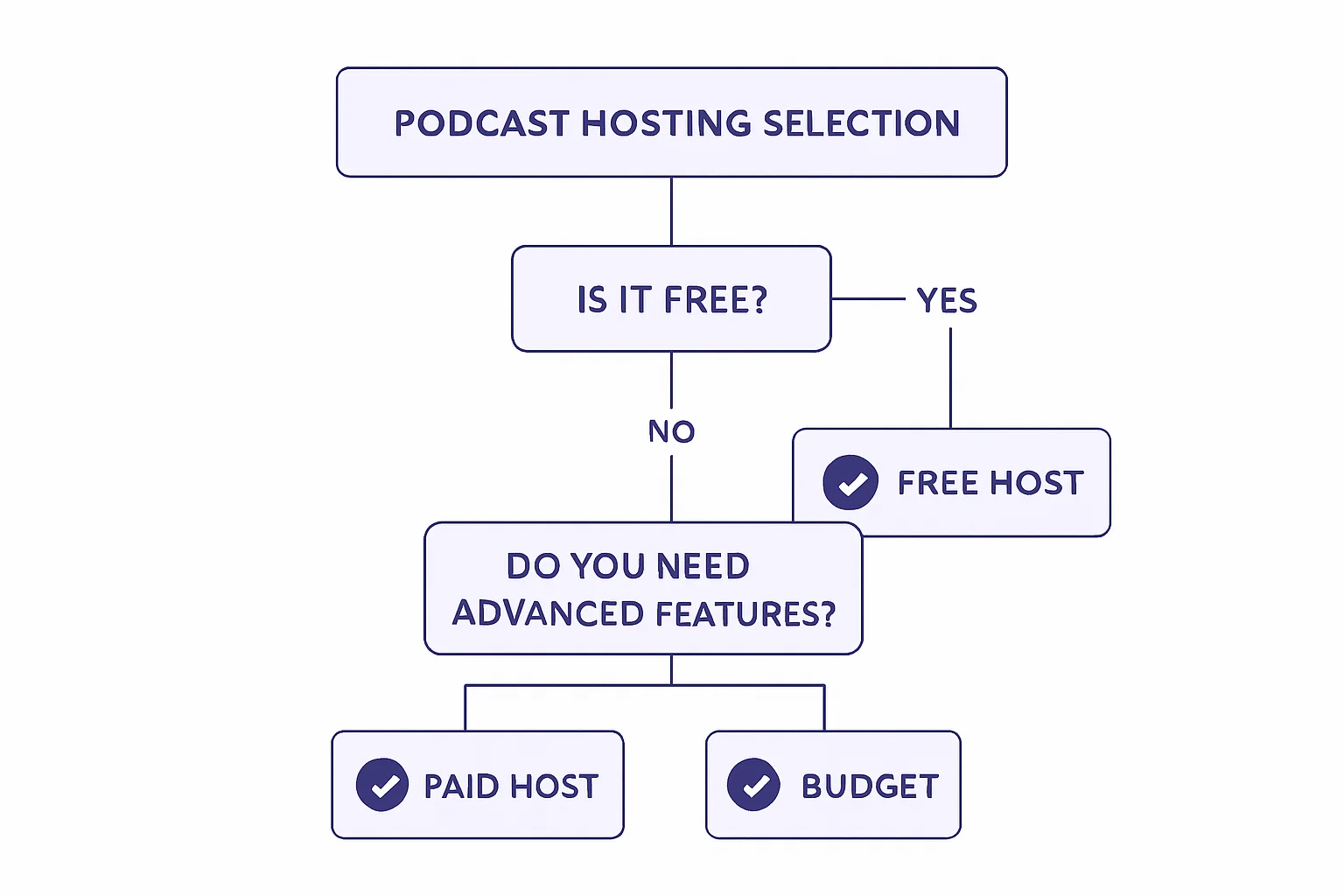
With dozens of options, choosing feels overwhelming. This five-step framework simplifies the decision. Work through each step in order, and you’ll narrow down to 2-3 platforms that genuinely fit your situation.
The 5-Step Decision Framework
Step 1: Set a realistic budget.
Podcast hosting typically costs $0-20/month for individual creators. Here’s how the tiers break down:
- $0 (Free): Spotify for Creators. Good for testing commitment, limited long-term.
- $5-10/month: Budget platforms with caps on downloads or upload hours.
- $9-15/month: Quality unlimited hosting. Best value for serious beginners.
- $19+/month: Feature-rich platforms, often overkill for beginners.
If you’re serious about podcasting, budget $9-15/month. That’s less than a Netflix subscription for a platform that can support your show for years.
Step 2: Identify your must-have features.
For most beginners, the must-haves are:
- Unlimited storage and bandwidth (no surprises)
- Easy distribution to Apple and Spotify
- Basic download analytics
- Simple, intuitive interface
Everything else is nice-to-have. Don’t let feature checklists distract you from these essentials.
Step 3: Check the growth path.
Ask yourself: “Will I outgrow this platform in 12 months?”
If you hit 25,000 monthly downloads (a successful podcast), will your costs explode? Will you need features the platform doesn’t offer? Will you be forced to migrate at the worst possible time?
Choose a platform that supports both your current needs and your realistic growth trajectory. Our complete buyer’s guide compares how platforms scale as you grow.
Step 4: Read the cap fine print.
Download limits, storage restrictions, and upload caps are often buried in pricing page footnotes. Don’t skim. Read every asterisk.
Questions to answer:
- What’s the download limit per month? (Some start at 10,000-20,000)
- What’s the storage limit? (Some cap at 3-10 hours monthly)
- What happens when you exceed limits? (Auto-upgrade? Overage fees? Throttling?)
Step 5: Test with a free trial.
Most quality hosting platforms offer 14-day free trials. Use them. Upload a test episode. Navigate the dashboard. Check the analytics. Submit to Apple Podcasts.
The trial period reveals whether the platform feels intuitive or frustrating. Trust your experience over marketing promises.
Beginner Platform Comparison
| Factor | Free (Spotify for Creators) | Budget ($5-10) | Value ($9-15) | Premium ($19+) |
|---|---|---|---|---|
| Best for | Testing commitment | Hobbyists | Serious beginners | Established shows |
| Download limits | None (but Spotify-first) | Often 10-20K/month | Usually unlimited | Usually unlimited |
| Storage | Unlimited | Limited hours | Unlimited | Unlimited |
| Analytics | Basic | Basic | Good | Advanced + IAB |
| Growth ceiling | Medium | Low | High | High |
| Migration ease | Difficult | Moderate | Easy | Easy |
Quick Takeaway: Budget $9-15/month, focus on unlimited hosting with easy distribution, and test before you commit.
What Budget Should Beginners Expect?
Let’s talk money. Podcast hosting is one of the most affordable business expenses you’ll encounter, but the pricing models vary significantly.
Free Hosting: Good for Testing, Limited Long-Term
Spotify for Creators (formerly Anchor) offers free podcast hosting. You can upload episodes, distribute to major platforms, and track basic analytics without paying anything.
The trade-offs:
- Spotify-first ecosystem. Your podcast is optimized for Spotify, which is great if most of your listeners use Spotify. Less great if you want equal presence everywhere.
- Limited analytics. Basic download counts without the depth serious podcasters need.
- Less control. You’re building on Spotify’s platform. If they change policies or features, you adapt or leave.
- Migration complexity. Moving away from Spotify for Creators is more complicated than switching between traditional hosts.
Free hosting makes sense in one scenario: you’re not sure if you’ll stick with podcasting and want to test the waters before investing money. If you’re committed to building an audience, paid hosting is worth the investment.
$5-10/Month: Budget Platforms with Caps
Several platforms offer hosting in the $5-10 range. The prices look attractive until you examine the limits.
Common restrictions at this tier:
- 10,000-20,000 download caps per month
- 3-4 hour upload limits per month
- Basic analytics only
- Limited distribution options
These platforms work for hobbyist podcasters who publish occasionally and don’t expect significant growth. But if your podcast takes off, you’ll hit limits quickly and face tier jumps or migration.
$9-15/Month: Best Value for Serious Beginners
This is the sweet spot. Platforms in this range typically offer:
- Truly unlimited storage and bandwidth
- Comprehensive distribution to all major directories
- Solid analytics (downloads, listeners, geography)
- Room to grow without tier jumps
At $9-15/month ($108-180/year), you’re investing less than $0.50 per day in your podcast. For a platform that can support your show for years, that’s exceptional value.
The Math on Why Unlimited Makes Sense Early
Let’s run the numbers on a hypothetical growth scenario.
Scenario: You start at 5,000 downloads/month and grow to 25,000 over 12 months.
Tiered pricing platform ($19/month for 20,000 downloads):
- Months 1-8: $19/month = $152
- Months 9-12: $49/month (exceeded cap) = $196
- Year 1 total: $348
Unlimited platform ($9/month):
- Months 1-12: $9/month = $108
- Year 1 total: $108
The unlimited platform saves $240 in year one alone. And the savings compound as you grow. Learn what “unlimited” really means and why it changes the math entirely.
How Long Does It Take to Get Your Podcast Live?
One of the biggest fears beginners have: “Is this going to take forever?” The honest answer might surprise you. Getting your podcast live is faster than most people expect.
The Setup Process (What to Expect)
Here’s a realistic timeline for going from zero to live:
Account creation: 5 minutes Sign up, verify your email, set a password. Most platforms have you inside the dashboard within minutes.
Podcast setup: 10-15 minutes Enter your show name, write a description, upload cover art (1400x1400 pixels minimum), and configure basic settings. If you have your artwork ready, this goes quickly.
First episode upload: 10-15 minutes Upload your audio file, write episode title and description, add show notes if you want them. The upload time depends on file size and your internet speed.
RSS feed generation: Automatic
Your hosting platform generates your RSS feed automatically. No technical work required. You’ll get a URL that looks something like: https://feeds.yourhost.com/yourpodcast
Apple Podcasts submission: 15 minutes + 1-3 day approval Copy your RSS feed URL, go to Apple Podcasts Connect, submit your show. Apple reviews every new podcast, which typically takes 1-3 business days. Sometimes faster, occasionally up to 5 days.
Spotify submission: 10 minutes + instant to 24 hours Similar process through Spotify for Podcasters. Approval is usually much faster than Apple, often within hours.
Other directories: 30-60 minutes total Amazon Music, iHeartRadio, Podcast Index, and others. Each takes a few minutes. Our complete distribution guide walks through submitting everywhere.
Total Time: 1-2 Hours from Signup to Submitted
The active work takes 1-2 hours. Then you wait for Apple and Spotify approval (usually 1-3 days). By the end of the week, your podcast is live everywhere.
Compare that to other creative projects. Building a YouTube channel with quality videos takes weeks. Starting a blog with meaningful content takes months. Podcasting has one of the lowest barriers to entry of any content medium.
Quick Takeaway: Budget 1-2 hours for setup, then 1-3 days for directory approval. You can be live by this time next week.
Why VNYL Works for Beginners Who Want to Grow
We built VNYL specifically for this problem: podcasters who want a beginner-friendly platform that doesn’t force them to migrate when they succeed.
Beginner-Friendly Onboarding (No Overwhelm)
The dashboard shows you what you need, when you need it. Upload your episode. Write your description. Hit publish. No feature overload. No confusing menus. Just clear steps to get your podcast live.
When you’re ready for advanced features, they’re there. But they don’t clutter your experience on day one.
Unlimited from Day 1 (No Caps to Stress About)
Upload as many episodes as you want. Get as many downloads as you can. No storage limits. No bandwidth throttling. No surprise tier jumps.
You focus on creating content. We handle the infrastructure. Your costs stay predictable whether you have 100 listeners or 100,000.
Pro Features When You’re Ready
As your podcast grows, VNYL grows with you:
- IAB-certified analytics for accurate advertiser-ready numbers
- Team collaboration when you bring on editors or co-hosts
- Scheduling and automation to streamline your workflow
- Distribution to every major platform with one click
These features are included or available as you need them. You don’t pay for what you’re not using.
Founder Pricing: $9/Month Locked Forever
Here’s the thing about today: it’s the last day of November, which means it’s the last day to lock in founder pricing.
Founder pricing is $9/month ($90/year) locked forever. That’s not an introductory rate that jumps after 12 months. It’s the price you pay as long as you’re with VNYL.
Regular pricing starts tomorrow at $13/month ($156/year). The difference adds up: founder pricing saves you $66 every year, indefinitely.
Limited to the first 100 founders. 14-day free trial to make sure it’s right for you. No risk, significant reward if you’re serious about starting your podcast.
Ready to Start Your Podcast Journey?
Let’s recap what you’ve learned:
What you need: Unlimited storage, automatic distribution, basic analytics, simple interface. That’s it. Don’t let feature lists overwhelm you.
What you don’t need yet: Dynamic ads, team collaboration, IAB-certified analytics, multiple show support. These matter later. Focus on creating first.
How to choose: Set a budget ($9-15/month is the sweet spot), identify must-haves, check for hidden caps, and test with a free trial.
How long it takes: 1-2 hours of active work, plus 1-3 days for directory approval. You can be live by this time next week.
The hardest part of podcasting isn’t the technology or the hosting platform. It’s pressing record for the first time. Everything else is learnable, fixable, and far less scary than it seems from the outside.
Today’s the Last Day: Founder Pricing Ends Tonight
Lock in $90/year unlimited hosting forever. Perfect for beginners who want to grow without limits.
Regular price starting tomorrow: $156/year.
Limited to 100 spots. No-risk 14-day trial.
Start Your Podcast Journey with VNYL
You’re about to start something incredible. The tools are accessible. The audience is growing. The only thing missing is your voice.
Welcome to podcasting. Welcome to VNYL.
Want more podcasting tips? Join our newsletter at vnyl.fm for weekly insights on growing your podcast and reaching more listeners.